I have run into a problem repeatedly recently. On a client computer running Windows 11, if I go to open the Windows Security Center, it won't open and I will get the following message/error:

Some websites will recommend the following:
"Go to the Settings. Select App > Apps & features and type in ‘security’ in search menu box. An icon for Windows Security will pop open. From there, click on the options (three dots) and select Advanced options. Now scroll down to Reset section and click on Reset.
You’ll get a confirmation asking if you really want to reset the app, along with your whole app data. Click on Reset to go with it."
However, so far what I have found is that "Windows Security" is not in the application list at all!
So how can I reset the app?
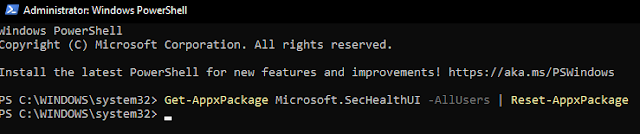
Well, what I have found was a simple command you can run from the Windows PowerShell (with administrative privileges) that ultimately solved the problem for me, as well as for some of my clients who have run into this same issue as well.
- Using Windows' search, just type in "PowerShell"

- Right-click on its icon, and select "Run as Administrator"
- Next, copy and paste (or type in) the following script:
Get-AppxPackage Microsoft.SecHealthUI -AllUsers | Reset-AppxPackage
- Hit Enter, and you should get a screen like this: